Alexandria is rolling out firm by firm. If you don't see it in the sidebar, your firm doesn't have it yet. Some parts, such as filters and market reports, can be switched off on their own.
Transcript Library (Alexandria)
Your firm's shared library of expert calls. Search it, chat with it across projects, and publish your own calls into it so the whole firm can learn from them.
Where JuniorGPT answers from one project, Alexandria answers from your whole firm. It is a shared library of expert calls, published from projects across your organization. Everyone in the firm can search it, chat with it, and read the calls inside it. Use it when the answer sits in someone else's project, not just your own.
Open Alexandria
Open Alexandria from the left sidebar. It opens a full-page chat with three parts:
- The sidebar on the left, with your past chats.
- The chat in the middle, where you ask questions.
- A market report section that displays industry coverage
- A source panel that opens when you click a citation.
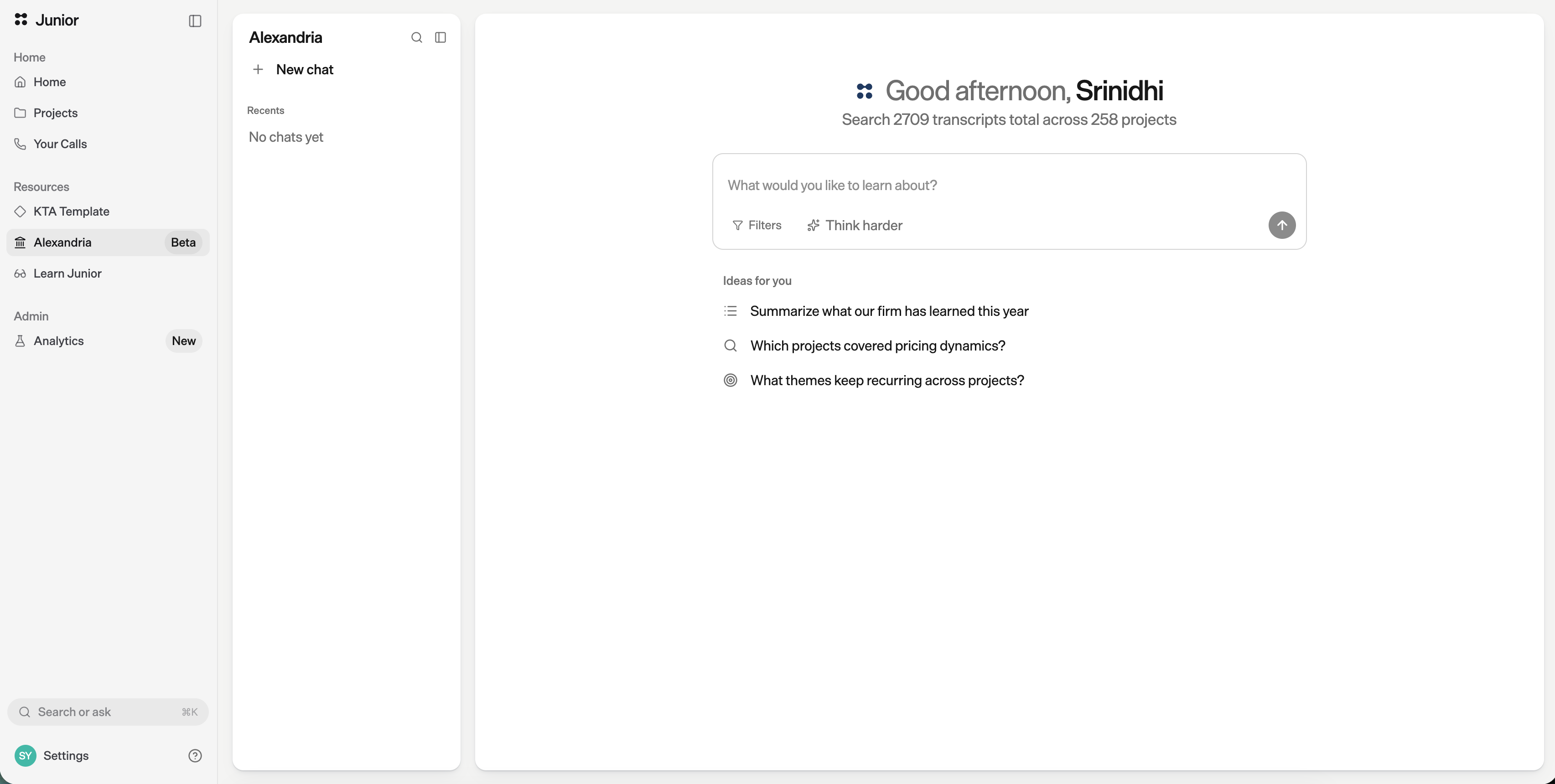
Ask past projects a question
Type your question the way you'd say it out loud. Alexandria answers from every call in the library and cites the quotes behind its answer, the same way JuniorGPT does.
- Search a market or topic to get smart on a project, e.g. "What are the 5G rollout timelines in Southeast Asia? Show me in a table by geography."
- Pull direct quotes or data points from all past experts on a given theme, e.g., "What do experts say about the downstream effects of GLP-1s?"
- Compare and contrast views across multiple interviews on the same theme e.g., "How do views differ across battery cell manufacturers on the pace of EV production capacity growth? Break out by interview."
Citations are clickable. Click one to open the source panel and jump to the exact call it came from.
Narrow the scope
To focus an answer, open Filters and limit the chat to a date range. The chat then draws only on the calls that match.
Filters may not be switched on for your firm. If you don't see the Filters button, Alexandria still works across every call in the library.
Publish your calls to Alexandria
Calls only reach Alexandria when they are published. This is how your project's work becomes searchable for the rest of the firm.
Publish expert calls only. Do not publish internal calls, management calls, client calls, or calls from warm leads.
When calls get published
In opt-in mode, publishing starts when a project goes stale. A project goes stale when it has had no new activity for a while — no new calls, uploads, or edits. Junior treats a stale project as finished, and that is when it asks you to publish its calls. In opt-out mode, the opt-out settings card appears before a project goes stale, so you can review its calls earlier.
Only the project lead can change what goes into Alexandria. This is true for both flows below. Other members can see the reminder and open the list, but the lead makes the final call.
How publishing works then depends on how your firm has set it up. There are two modes.
Opt in (you choose what to publish)
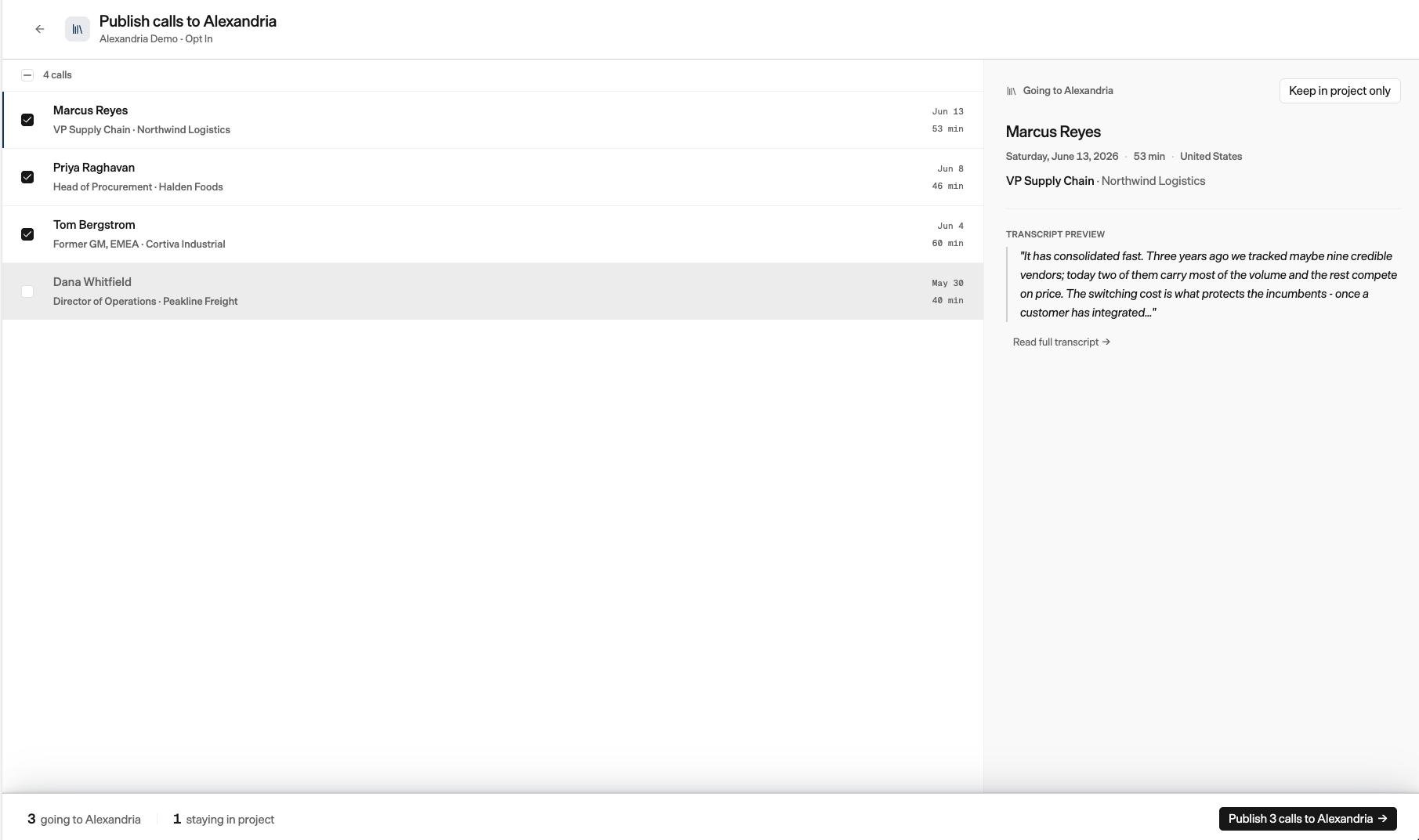
In opt-in mode, nothing leaves your project until you send it. Open the project and go to Publish calls to Alexandria.
- You see a list of the project's calls, each with a checkbox.
- Interviews are ticked by default. Meetings are not. Tick or untick each call to decide what goes.
- Click finish. Junior asks you to confirm, then shows how many calls will be published.
Once you confirm, Junior indexes the calls in the background. They appear in Alexandria after the buffer period your firm has set (see The buffer period below).
Opt out (calls are published automatically)
In opt-out mode, Junior publishes your interviews to Alexandria automatically on a set date. You get time to review them first.
- The project shows Review calls for Alexandria with a countdown.
- Open the review list and untick any interview you want to keep out. You can also publish meetings, which are never published automatically.
- Your changes save on their own, so there is no separate save step.
You can also open this review on the project's Billing & Settings page, where you can amend which calls to opt out at any point before the deadline. The reminder pill on the project card takes you to the same place. Both show how long you have left.
Add a call right after it ends
Coming soon. You won't always have to wait for a project to go stale. Any team member will be able to opt a single call into Alexandria as soon as it ends. Calls will still be added to Alexandria after the project goes stale.
The buffer period
Your firm can set a buffer period. When a project goes stale, its calls wait a set number of days before they are published to Alexandria. That window is there so your compliance team can review the calls first and pull anything that shouldn't go into the library — a call holding material non-public information (MNPI), for example.
Removing a call from Alexandria
You can remove a call after it is published. For now this is an administrative task, so contact Junior Support and they will remove it for you.
Questions
How is Alexandria different from JuniorGPT?
JuniorGPT answers from one project's calls. Alexandria answers from every published call across your firm. Reach for JuniorGPT inside a project, and Alexandria when the answer could live in any project.
Who can see the calls I publish?
Everyone in your organization. Publishing a call makes it searchable across the firm, so only publish expert calls — never internal, management, or client calls.
Can I remove a call after publishing it?
Yes, but it's an administrative task for now. Contact Junior Support and they'll remove the call from the library for you.
Why isn't my call in Alexandria yet?
A published call will appear in Alexandria after the buffer period that your firm has chosen. Meetings are never added unless someone includes them.