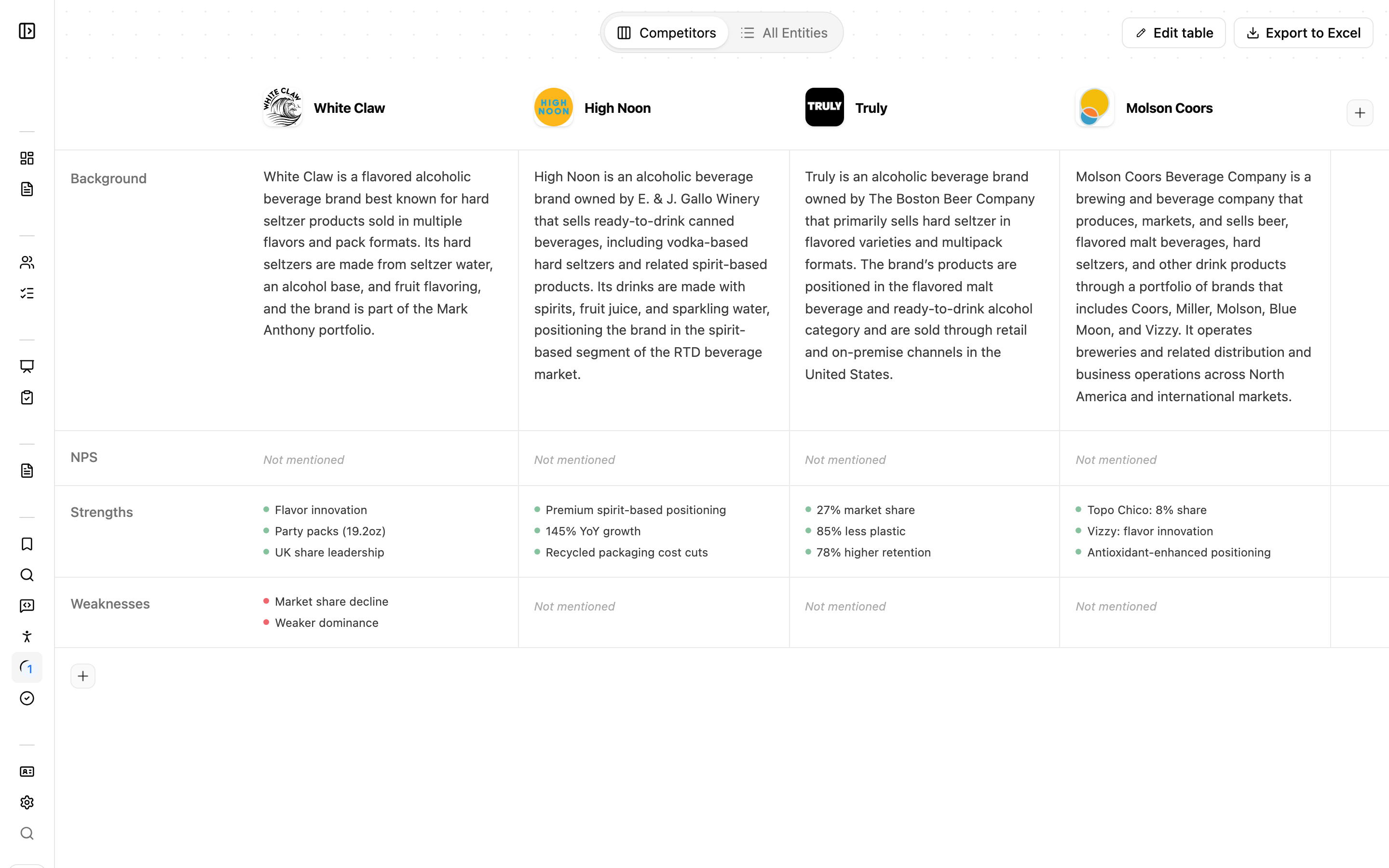
As your calls are processed, Junior automatically recognizes the companies and products mentioned across them. These are your entities. You can explore them as a full list and benchmark them against each other in the Competitive Set, which pulls together everything that has been said about each one.
Your entities appear in two views:
- Competitive Set: a benchmarking matrix comparing companies across metrics. This is the default view.
- All Entities: the full list of recognized companies and products.
All Entities
The All Entities view is a searchable, sortable table of everything Junior has recognized, sorted by number of mentions by default so the most-discussed entities rise to the top.
To add entities yourself:
- Add a single entity: give it a name and a category to help classify it.
- Paste a list: add many entities at once.
You can also export the list.
Entity detail
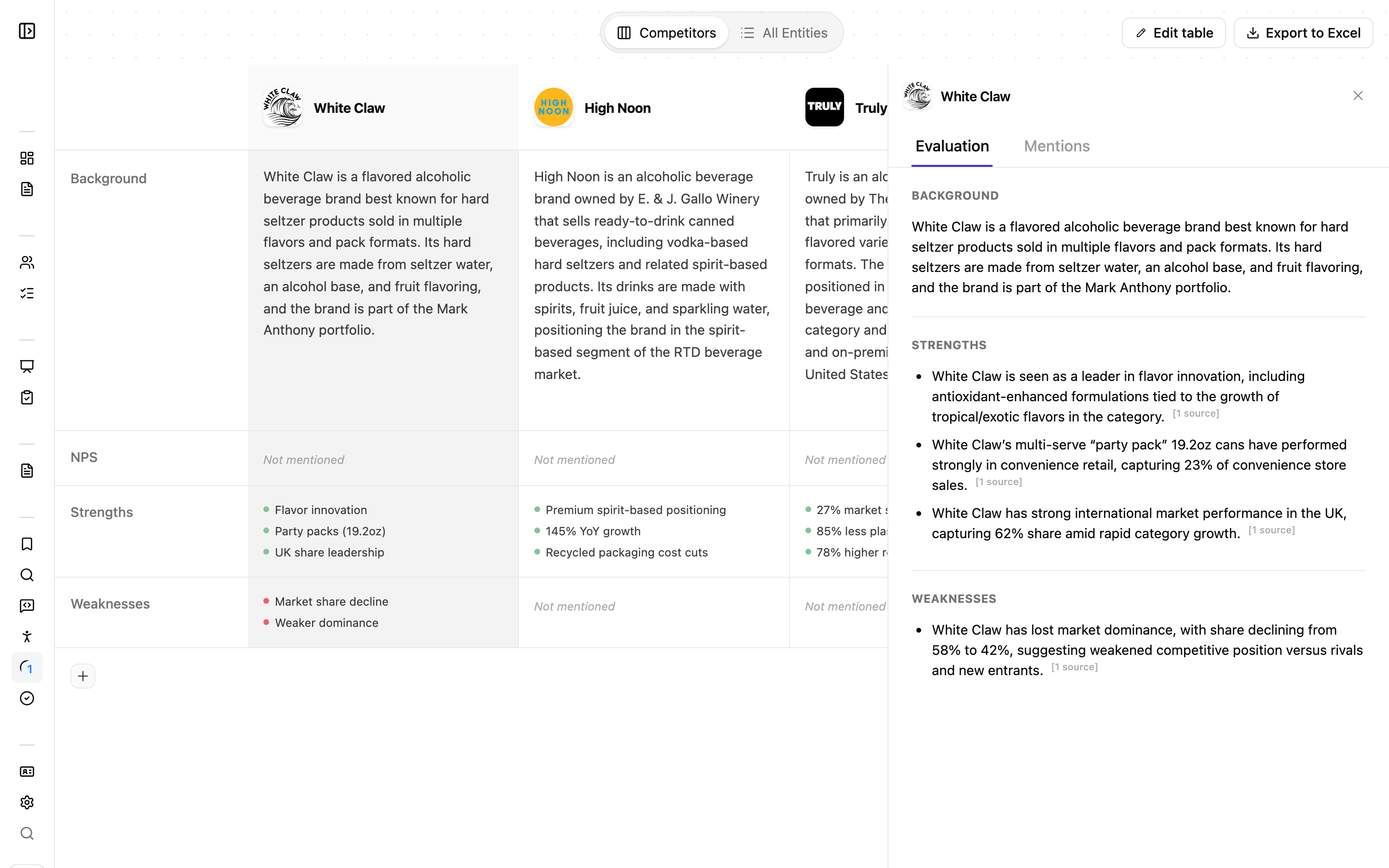
Open any entity to see its detail view, which has two tabs:
- Overview: a description, its products and services, an NPS score shown as a bar, and AI-generated Strengths and Weaknesses.
- Mentions: every quote across your calls that references this entity. Click a mention to jump straight into that transcript. The list grows as more calls are processed.
Actions on an entity
- Edit details: refine the name, category, or description.
- Split: break one wrongly-merged entity back into several separate ones.
- Enrich from web: pull in the company's logo and details automatically from its website domain.
- Delete: remove the entity.
Merging duplicates
Experts rarely name a company the same way twice. Junior detects likely duplicates and misspellings (for example, "Salesforce" and "SalesForce") and suggests merging them so your data stays clean.
- Review or Dismiss a merge suggestion when Junior offers one.
- Merge manually: select two or more entities and choose which one to keep.
Editing and merging from within a transcript
When you edit or merge an entity from inside a transcript, Junior asks you to choose a scope:
- Everywhere: apply the change to all transcripts in the project.
- This instance only: apply it only to the mention in front of you.
Editing "Everywhere" changes past and future calls. Renaming or merging an entity "Everywhere" rewrites every matching mention across all of the project's transcripts, and it applies to future calls too. This is useful for cleanup, but it isn't limited to the call you're looking at. If you only mean to fix the mention in front of you, choose This instance only.
The Competitive Set
The Competitive Set is a grid that compares companies side by side, with one row per tracked metric, so you can see how different companies or products are rated and described at a glance. For any metric, you can open an expert-level breakdown to dig deeper. Each cell can be:
- an NPS score,
- a numeric value, or
- a bullet list.
From here you can:
- Add competitors and metrics to shape the comparison you care about.
- View the source Q&A behind any value, so every number traces back to what was said.
- Export to Excel for further analysis or sharing.
The matrix is empty until calls are processed, then fills in as the data comes through.